Contingency fee matters work differently from hourly billing. You do not bill the client for time. Instead, your fee is a percentage of the recovery when the case resolves. But you still need to track the time you invest so you understand the true cost of each case.
Setting Up Contingency Billing
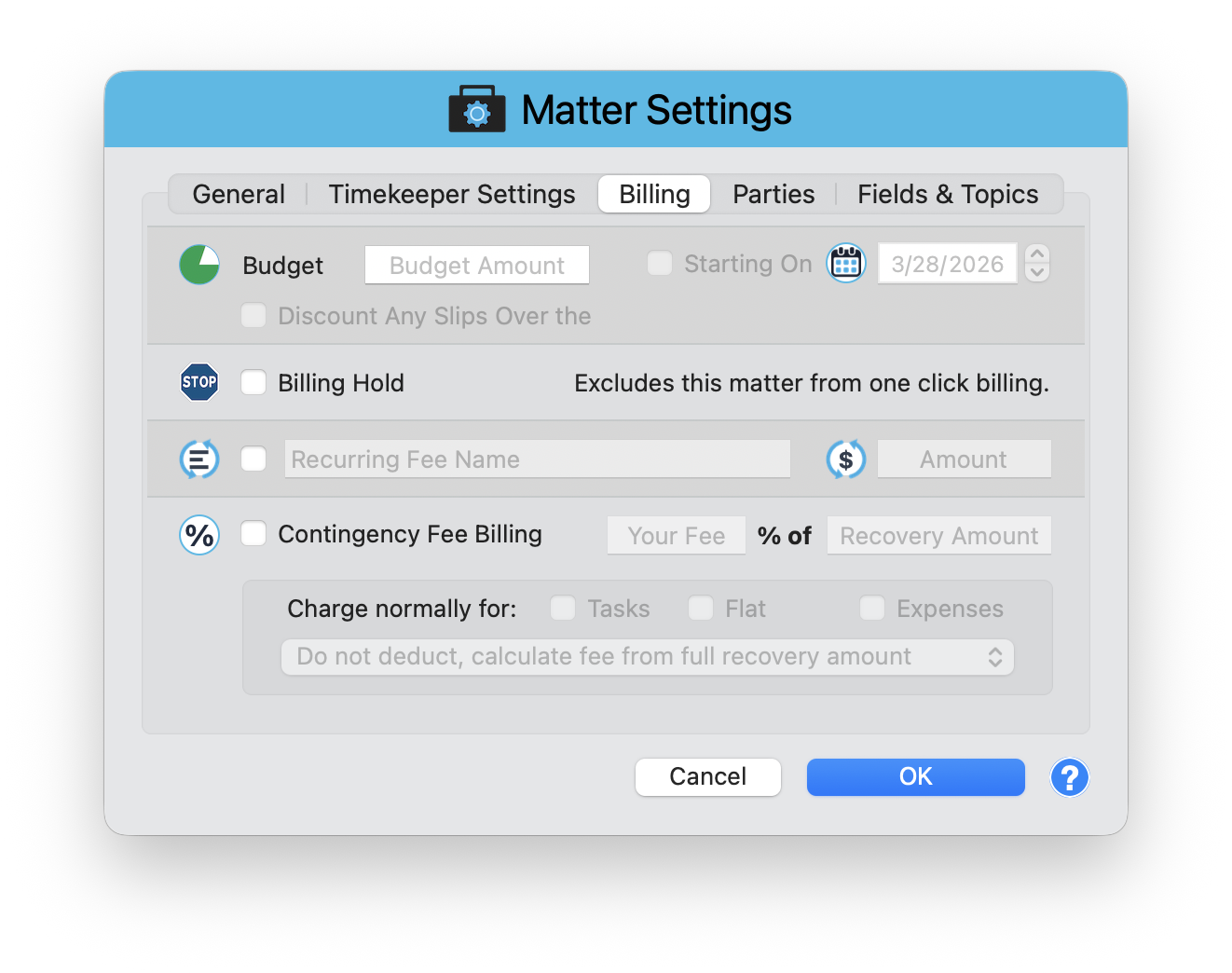
Contingency billing is configured in Matter Settings > Billing tab. Open the Matter window, click Matter Settings in the toolbar, then select the Billing tab.
Enable Contingency Fee Billing
Check the Contingency Fee Billing checkbox to activate contingency mode for this matter.
Set Your Fee Percentage
Enter your fee in the Your Fee field as a percentage of Recovery Amount. For example, 33% for a standard personal injury case.
Choose What to Charge Normally
The "Charge normally for:" checkboxes let you bill certain entry types at regular rates even on a contingency matter. Options include Tasks, Flat fees, and Expenses. This is common for out-of-pocket costs like filing fees and expert witness charges.
Set the Deduction Mode
The deduction mode dropdown controls how costs are handled relative to the recovery. The default is "Do not deduct, calculate fee from full recovery amount", which means your percentage applies to the gross recovery. Other options may allow deducting costs before calculating the fee.
Tracking Time on Contingency Matters
Even though the client is not billed hourly, you should still record time entries. This gives you a clear picture of how much the firm invested in the case. When the case resolves, you can compare your contingency fee against the actual time invested to measure profitability.
Track every hour on contingency cases. When a 33% fee on a $300,000 recovery produces $99,000 but you invested 400 hours of attorney time, you know exactly what that case cost. This data helps you decide which contingency cases to accept in the future.
Calculating the Fee
When the case resolves, enter the recovery amount and TimeNet Law calculates your contingency fee based on the percentage and deduction mode you configured. If you enabled "Charge normally for" certain entry types, those charges appear separately alongside the contingency fee.
Know Your True Cost
Contingency billing in TimeNet Law gives you the best of both worlds: your fee is calculated as a percentage of recovery, but you still have full visibility into the time and resources invested. That data turns guesswork into informed case selection.
Keep exploring:
- Discounts, Markdowns, and Write-Offs - billing adjustments for every scenario
- Matter Budgets - set spending caps and track progress
- Expense Tracking - record costs that get billed normally on contingency matters
Questions About Contingency Setup? Perry Can Help.
Perry can walk you through configuring contingency billing and show you how to track your investment effectively.