What You'll Learn
The difference between discounts, markdowns, and write-offs. When to use each one, how to apply them in TimeNet Law, and how each affects your realization and collection rates.
Not all billing adjustments are the same. Discounts, markdowns, and write-offs each serve a different purpose and happen at a different stage of the billing process. Using the wrong one (or confusing them) can distort your financial reports and give you an inaccurate picture of firm profitability.
Here is the quick version: markdowns happen before invoicing, discounts happen during invoicing, and write-offs happen after invoicing. Let's dig into each one.
Markdowns - Pre-Invoice Adjustments
A markdown reduces the billable value of specific time entries before the invoice is created. You are adjusting the work product itself.
When to Use Markdowns
- Efficiency adjustments - A junior associate took 3 hours on a task that should have taken 1.5 hours. Mark down the entry to 1.5 hours before billing.
- Rate corrections - You agreed to a lower rate for certain types of work. Adjust the rate on those entries.
- Internal review - During pre-bill review, a partner decides certain entries are excessive and reduces them.
- Client guidelines - Some corporate clients have billing guidelines that cap time for specific activities. Mark down entries to comply.
How to Apply a Markdown
Review Time Entries
Before generating an invoice, review the time entries for the billing period. Look for entries that need adjustment.
Adjust Hours or Rate
Edit the specific time entry to reduce the hours or the billing rate. The original values are preserved in the entry history for your records.
Generate the Invoice
When you create the invoice, it uses the marked-down values. The client sees only the adjusted amount.
Markdowns affect your realization rate (the percentage of worked value that actually gets billed). If your realization rate is low, it might mean your team is consistently spending more time than clients will pay for. That is a staffing or training issue, not a billing issue.
Discounts - Invoice-Level Adjustments
A discount reduces the invoice total before you send it to the client. The client sees the full charges and the discount as a separate line item. It is a courtesy or negotiated reduction.
When to Use Discounts
- Negotiated fee reductions - You agreed to a 10% discount for a long-term client
- Volume discounts - Reduced rates for clients who send a high volume of work
- Goodwill gestures - A courtesy discount to maintain a relationship after a difficult matter
- Prompt payment incentives - A discount for paying within a certain number of days
How to Create a Discount
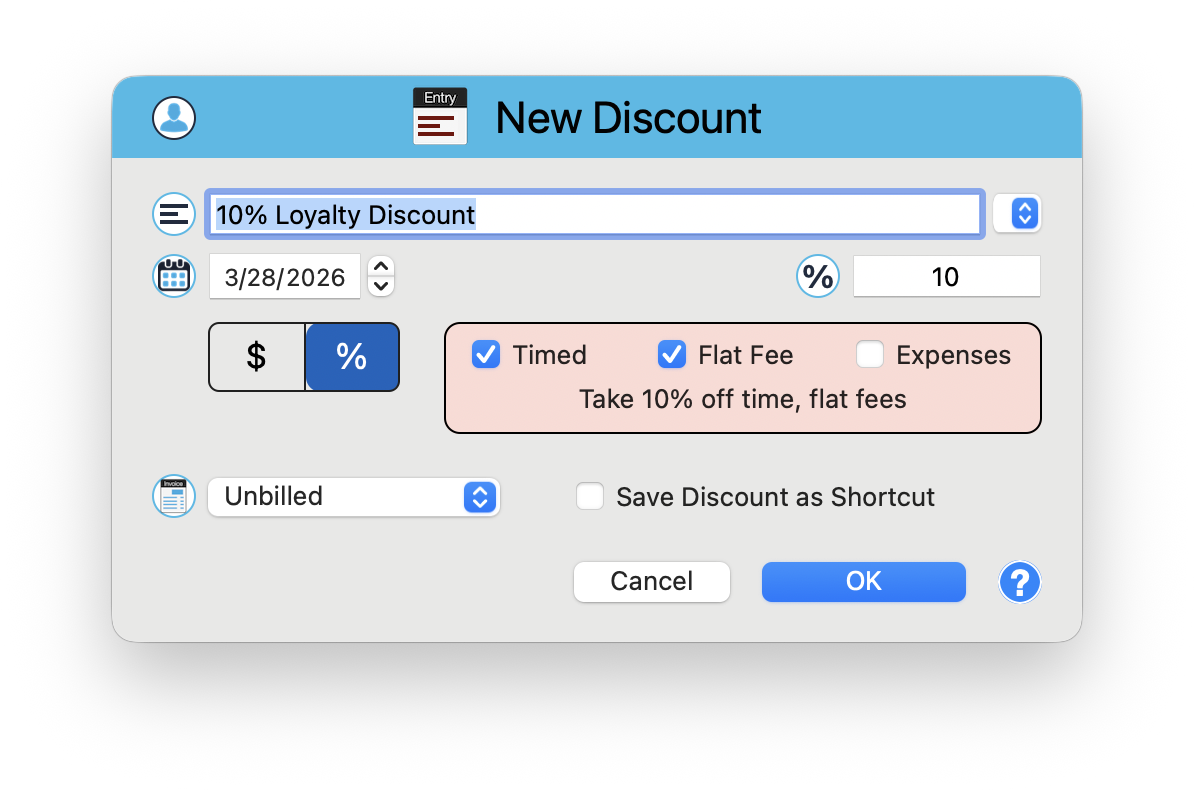
In the Matter window, create a New Discount entry. The discount window gives you precise control over what gets discounted and by how much.
Set the Description
Enter a description like "10% Loyalty Discount." The description field includes a dropdown for saved shortcuts, so frequently used discounts are one click away.
Choose Dollar or Percentage
Use the $ / % toggle to switch between a flat dollar discount and a percentage discount. When percentage is selected (highlighted blue), enter the percentage value.
Select What It Applies To
Checkboxes let you choose any combination of entry types: Timed entries, Flat Fee entries, and Expenses. A live summary updates as you make selections, for example: "Take 10% off time, flat fees."
Save the Discount
Click OK to apply. Check "Save Discount as Shortcut" to save this configuration for quick reuse on future discounts.
Write-Offs - Post-Invoice Adjustments
A write-off removes charges that will not be collected after the invoice has been sent. The client was billed, but payment is not coming. This is bad debt or uncollectible amounts.
When to Use Write-Offs
- Uncollectible invoices - A client cannot or will not pay, and you have exhausted collection efforts
- Partial payments - A client pays part of the invoice and you agree to write off the remainder
- Disputed charges - After a billing dispute, you agree to remove certain charges
- Statute of limitations - Invoices that are so old they are no longer worth pursuing
How to Record a Write-Off
Identify the Uncollectible Amount
Determine which invoice or portion of an invoice will not be collected.
Record the Write-Off
In the Billing Center or the matter's invoice view, apply a write-off to the outstanding balance. Enter the amount and a reason for the write-off.
The Balance Updates
The outstanding balance on the invoice decreases by the write-off amount. Your aging reports reflect the updated balance.
Write-offs affect your collection rate (the percentage of billed amounts that you actually collect). A high write-off rate is a red flag. It might mean you are taking on clients who cannot pay, or that your invoices are not being sent promptly enough.
Side-by-Side Comparison
Here is how the three adjustments compare:
- Markdown - Happens before invoicing. Adjusts the time entry itself. Affects realization rate. Client never sees the original amount.
- Discount - Happens during invoicing. Reduces the invoice total. Affects realization rate. Client sees both the full amount and the discount.
- Write-Off - Happens after invoicing. Removes uncollectible charges from the outstanding balance. Affects collection rate. Client was already billed.
Example Scenario
An attorney bills 10 hours at $400/hour on a matter. Here is what each adjustment looks like:
- Original value: $4,000
- After markdown (2 hours reduced): Invoice shows $3,200. Realization rate: 80%.
- After discount (10% off $3,200): Invoice total: $2,880. Client sees $3,200 minus $320 discount.
- After write-off ($500 uncollectible): You collected $2,380 of the $2,880 billed. Collection rate: 82.6%.
The overall effective collection on the original $4,000 of work: 59.5%. Understanding where the money goes at each stage is the key to improving firm profitability.
Impact on Firm Profitability Reports
Each adjustment type flows into different metrics in your financial reports:
- Realization rate = Billed / Worked. Affected by markdowns and discounts.
- Collection rate = Collected / Billed. Affected by write-offs.
- Overall effective rate = Collected / Worked. Affected by all three.
TimeNet Law tracks all three adjustment types separately, so you can pinpoint exactly where value is being lost. Is the problem that your team is over-working matters (markdowns)? That you are giving away too much (discounts)? Or that clients are not paying (write-offs)? The data tells the story.
Review your markdowns, discounts, and write-offs quarterly. Look for patterns. If one client consistently requires large markdowns, it might be time to renegotiate the engagement terms or adjust staffing. Data-driven billing decisions beat gut feelings every time.
Use the Right Tool for the Job
Markdowns, discounts, and write-offs are three different tools for three different situations. Use each one correctly, and your financial reports will give you an accurate, actionable picture of firm performance. Mix them up, and you are making decisions based on bad data.
Keep exploring:
- Contingency Billing - track matters where you are not billing hourly at all
- Tax Rules and Late Fees - billing compliance and overdue invoice management
- Custom Billing - advanced billing workflows
Not Sure Which Adjustment to Use? Perry Can Help.
Perry can explain the difference and show you how to apply each one correctly in your specific situation.