The Problem with Legal Invoices
Every day, your clients receive a stack of mail. Bills, statements, letters—all on the same boring white paper with the same generic layouts. Your invoice lands in that pile looking exactly like everything else.
Most billing software treats invoices as an afterthought. You get a handful of templates with maybe a logo upload. That's it. Your invoice ends up looking like it came from the same place as their electric bill.
Invoice Architect Changes Everything
Invoice Architect is a visual design studio built specifically for legal invoices. Control typography, colors, layouts, blocks, curves, stamps—even gradients and graphics. Create invoices so distinctive that clients recognize your firm the moment they open the envelope.
SCREENSHOT: Side-by-side comparison: a bland, generic white invoice from typical billing software vs. a stunning, branded Invoice Architect invoice with custom colors, typography, and header graphics
Left: what your clients are used to. Right: what Invoice Architect creates.
What You Control
Invoice Architect gives you complete visual control over every aspect of your invoices:
Colors
Match your firm's brand palette exactly
Typography
Fonts, sizes, weights, spacing
Layout
Section positioning and structure
Blocks
Content containers and groupings
Curves
Rounded corners and smooth edges
Stamps
PAID, DRAFT, custom markers
Gradients
Smooth color transitions
Graphics
Headers, patterns, backgrounds
SCREENSHOT: Invoice Architect design panel showing the full control suite — color picker, typography settings, layout controls, block editor, curve sliders, and stamp options all visible
Complete design control — colors, typography, layout, curves, stamps, gradients, and graphics
How It Works
Invoice Architect uses an intuitive section grid system. Your invoice is divided into logical sections—hover over any area to select it, then fine-tune it to perfection.
Hover over sections above to see how Invoice Architect's grid selection works
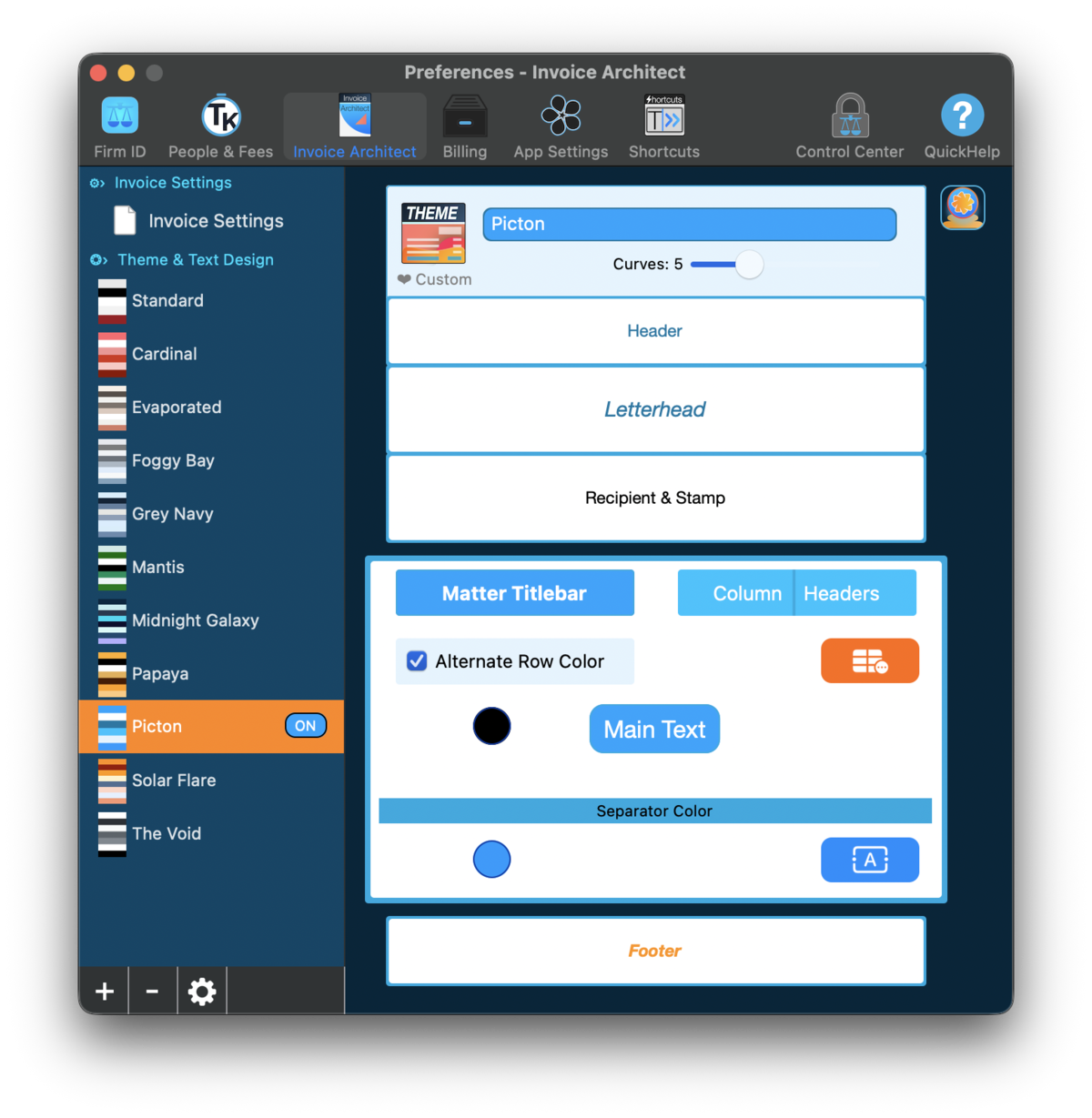
The Invoice Architect interface: templates on the left, visual section editor on the right
Getting Started
Open Preferences → Invoice Architect, then:
- Choose from a dozen built-in templates as your starting point
- Hover over the preview to select any section
- Use the simple tools to adjust colors, fonts, spacing, and more
- See your changes instantly in the live preview
Built-in Templates
Not starting from scratch. Invoice Architect includes a dozen professionally designed templates, each with its own personality:
- Standard — Clean and professional, a solid foundation
- Cardinal — Bold reds, confident and eye-catching
- Evaporated — Subtle, understated elegance
- Foggy Bay — Soft, calming tones
- Grey Navy — Classic professional, distinguished
- Mantis — Fresh green accents, modern feel
- Midnight Galaxy — Dark and dramatic
- Papaya — Warm, approachable vibes
- Picton — Bright blues, energetic and fresh
- Solar Flare — Warm oranges, sunset warmth
- The Void — Minimalist dark theme
Each template is fully customizable. Start with one that's close to your vision, then make it entirely yours.
Pro Tip: Multiple Templates
Create different templates for different purposes—a premium look for high-value clients, a detailed format for litigation matters, a simple statement for monthly retainers. Switch between them as needed.
SCREENSHOT: Template gallery showing thumbnails of all built-in templates — Cardinal, Midnight Galaxy, Papaya, Picton, The Void, and others — each with distinct visual personality
Twelve starting points, infinite possibilities — pick a template and make it yours
Real-Time Preview
This is where Invoice Architect really shines. Every change you make appears instantly in the live preview—no guessing, no "save and check."
Two Stages of Real-Time Feedback
Design time: As you adjust colors, fonts, curves, and layout in the Architect, see exactly how your invoice will look immediately.
Invoice generation: When you're ready to bill, dial in the final details and see the actual invoice with real client data before you send it. No surprises.
Most billing software makes you generate an invoice to see what it looks like, then go back and edit, then generate again. Invoice Architect lets you perfect everything in real-time, at every stage.
VIDEO COMING SOON: Invoice Architect live preview updating in real-time as colors, fonts, and layout are adjusted — every change reflects instantly on the invoice preview
Looping video · No audio · ~10-15 seconds
Change a color, see it instantly. Adjust a font, see it instantly. No save-and-check cycle.
Making It Yours
Header Graphics
The header is prime real estate for your brand. Invoice Architect lets you add:
- Your firm logo (any size, positioned exactly where you want)
- Background colors, gradients, or even patterns
- Graphics and decorative elements
- Custom typography for your firm name
Color Matching
Enter your exact brand colors using hex codes, or use the color picker. Apply colors to any element—text, backgrounds, borders, accents.
Invoice Stamp Designer
Stamps aren't just functional—they're a design statement. Invoice Architect includes a full Stamp Designer with 8 built-in stamp sets, each fully customizable:
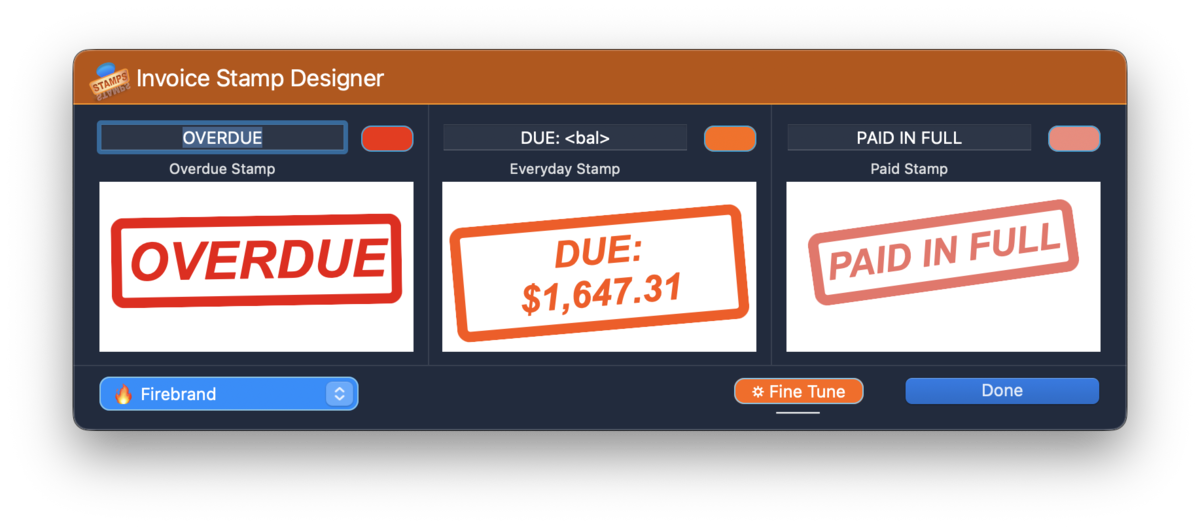
The Stamp Designer: OVERDUE, DUE (with dynamic balance), and PAID IN FULL stamps
The Stamp Designer includes controls for:
- Weathered textures — Make stamps look authentically hand-stamped
- Randomized angles — Slight rotation for that "stamped by hand" feel
- Dynamic tags — Like
<bal>to show the actual balance due - Custom colors — Match your brand or use attention-grabbing reds
The PAID IN FULL stamp with weathered texture and a slight tilt looks so authentic, clients might think you literally rubber-stamped their invoice.
Typography
Control every text element independently. Make headers bold and authoritative, body text clean and readable, totals prominent and unmissable.
Why This Matters
Your clients receive dozens of bills every month. The electric company, the credit card, the mortgage—all bland, all forgettable, all slightly annoying.
Then they open your invoice.
With Invoice Architect, your bill doesn't look like a bill. It looks like a document from a firm that takes pride in everything they do. The colors match your letterhead. The layout is thoughtful. The design says "we pay attention to details."
First Impressions, Every Time
Every invoice is a touchpoint with your client. Make it count. A professionally designed invoice reinforces the quality of your legal work before they even read the first line item.
SCREENSHOT: A beautifully designed Invoice Architect invoice sitting on a desk — branded colors, custom typography, professional stamp — standing out from a stack of generic white bills
Your invoice shouldn't look like everyone else's electric bill